Showing posts with label 02 Cameras and Equipment. Show all posts

Tuesday, 1 February 2011

Flash Accessories

Having wrote a blog post on the different types of flash, it seems necessary to finish this subject with the accessories used with flash.

Reflectors

reflector

As some of the group will know, I often carry at least one small white reflector in a pocket in my camera bag, just in case I or others need it, it’s amazing what you can get on a magazine these days !
These can be used to reflect light to an area where the flash might not illuminate, to avoid shadows.

Reflectors are available in four colours: white; silver; gold and black.

White reflectors are used for reflecting diffused light towards the subject.

Silver reflectors are used to reflect brighter, more harsh light towards the subject.

Gold reflectors are used to reflect a bright and warmer light towards the subject.

Black reflectors, sometimes called 'French Flags', reflect shadows onto the subject. Although this one sounds odd, and completely the opposite to what a reflector is there for, but it works and can add a subtle shadow if necessary. 
 
 
Flash Triggers
pulsar

I mentioned briefly in my last post about flash triggers.  These units can trigger flash units (both small and studio) without the need for sync cables, for up to 100m.

Because some use radio transmission, rather than IR, it allows for triggering around corners, through walls and is not affected by high ambient light situations.

Flash triggers usually allow the photographer to choose from four individual channel and six studio selectors, each providing a unique ID for a different flash device or combine them to trigger all equipment within a given setup or studio.  This might sound an odd feature, but where other photographers may be near you it can prevent someone else’s trigger from setting off your flash.

This Pulsar flash trigger also features a hot-shoe mount, sync in and sync out terminals, a ready indicator, a test button and an external power option.

With these triggers each unit can be used as either a transmitter or receiver and is powered by just two AAA batteries, again not breaking the bank.

Photographic Flash

Personally, I prefer to use existing light as much as possible, hence the late additional of this posting.  But sometimes you have little alternative.

There are basically three types of flash:

  1. Built in Flash
  2. Accessory flash units / guns
  3. Studio Flash

Built In Flash

built in flash

The built in flash unit on a camera are very limited, usually with a guide number of about 10 – 13, at ISO 100.  Although not very powerful the main advantage is that these are always available, being built into the camera and can be very useful for fill in flash.


Accessory Flash Units / Guns


Flash Gun

These units offer far more power than built in flash units, and lots more options.

Above is one of my flash units, which has a bounce and pan head, which allows me to bounce the flash of ceilings and walls, which diffuses the light that illuminates the subject, although care has to be taken as sometimes the colour of the ceiling or wall, if a particularly strong colour, can leave a slight colour cast on the photograph.

My flash unit also has a zoom function that can concentrate the flash into the centre of the photograph, to match the focal length of you lens, or zoom setting, which is handy when you are limited how close to the subject that you can get.

Some flash units also have diffusers built in to the head to diffuse the light without having to bounce the light, removing the harsh flash that can sometimes ruin a photograph.

You may have noticed the Velcro pads on the side of the flash head, these were for a flash diffuser which fitted to the head of the flash unit, which was then angled up and the flash was bounced using this diffuser towards the subject.  Yes another of my gizmos !

Pocket Bouncer - flash modifyer

You can use these flash units either fitted on top of the camera, using the hot shoe adaptor, or off the camera on a tripod, controlled via slave sensor:

slave-adaptor

As shown above, or wireless / infra red trigger.  Also flash sync cables can be used, but care must be taken to prevent accidents from people tripping over, or even you pulling over the tripod, with its flash unit, if you walk off too far for the cable to reach.

In fact I have three Pentax Xtra Flash units, which are small self contained slave / flash units which I got for £5.00 each.  They work off one AA battery, so they would hardly break the bank for consumables.  These units do take some getting used to, but are something that, if carried in your camera bag, could make the difference between a good photograph and a badly lit one.

Pentax Slave Flash

Looking today, they are not available from this shop anymore, and one price I did find for these units was £19.99 !

The power of a flash unit is shown as it’s guide number, which shows how far the flash would be useful, based on using ISO 100 sensitivity (or film) in meters.  But this distance does not take in to account the use of bounce flash, so you would have to consider this when deciding if to bounce the flash off a ceiling or wall.


Studio Flash

Studio flash 2

These are the big daddy of the photographic lighting world, and are rarely seen outside a photographic studio, due to their size and their power requirements, so when I had a chance, on my last photographic course, to use them I jumped at the opportunity.

The heads to these units, shown below, can be fitted with a number of flash modifiers, for example soft boxes (as shown above (right)), umbrellas (as shown above (left)), snoots and barn doors.  These are used to soften, diffuse, direct and control the light from the flash to the subject.

These units are usually triggered via wireless or infra red, or sync cables, but again care has to be taken to avoid accidents.

Saturday, 15 January 2011

Macro Photography Techniques

Having covered product photography during the last course, I learnt a few valuable techniques for this assignment.  But this time, I wanted to photograph the subjects using the Pentax DSLR and not rely so much on the Fujifilm S7000.  This combined with the subjects being natural and situated outside in the garden.

The first consideration was the light, which was not as controlled as when I was taking the product shots, because now I was photographing the subject outside the house, where I wanted to use the natural light, only using a reflector when necessary to illuminate any dark areas that I wanted lighter to show the detail, as opposed to using the studio lights in the Burton College photographic studio.

The next consideration was focusing.  The S7000 has a macro mode and a super macro mode, the latter of which can focus down to 25mm.  Although I do not own a proper macro lens, some of my lenses can focus down to 450mm.


So this meant that that I could not get as close to the subject, as I could with the S7000.  This meant zooming in closer.  With the Tamron 18 - 200 mm lens this zoom range was the whole 18 - 200 mm, where as with the Sigma 75 - 300 mm lens only the focal range of 200 - 300 mm was available for macro use.

Next, I chose a large aperture to concentrate the viewer on the subject, rather than the background.  Working at larger apertures kept the depth of field shallow, blurring out the background.
 
Proper macro lenses have a reproduction factor of 1:1, life size, other lenses which can be used for macro work sometimes do not offer this.  But to me if the image is to be printed so people can see it clearly I will accept this and not buy proper macro lenses which cost more and, like the tilt and shift lenses used for architectural photography, have their own specific uses.


Saturday, 23 October 2010

Photo Editors

The photo editing software is the digital version of the photographers darkroom.

As per my previous post, where I discussed some of the different computer platforms, some photo editors are only available for certain platforms,  so I will try to show what platforms these editors are available for.  I will also say a bit about some of the free software available which can be powerful, and even portable !

My personal choice of photo editor is Serif's Photo Plus X4:


Serif Photo Plus  (Paid for  -  Windows only)


This program can handle RAW formats as well as files from Adobe PhotoShop (psd) and Corel Paintshop Pro (psp), with both opening and saving files in psd and psp formats, with layers fully supported.  This editor is only available for the windows platform.

I find that this software is very powerful, with a wide range of options available, but without being too resource hungry (needing very high memory capacity, powerful processors, and storage capacity) and at a reasonable price.


PhotoShop (paid for - Windows and Apple Mac)


This is seen as 'the' photo editor, used by professional photographers world wide, because of its sheer power, but its power comes at a price, both cost wise and resources required.

Adobe photoshop is a very powerful editor used for editing photographs, images for websites, and advertising.

Photoshop, originally started in 1987 under the name of 'Display' by Thomas Knoll, this was later developed into an image editor, before a meeting with Adobe where they purchased the licence to the now named 'Photoshop' program.

Photoshop has a number tools to make adjustments to images including levels, curves, vibrancy and tones of colours, as well as cropping images.  There are also plugins available for photoshop for adding more tools to the very large selection available.

Photoshop can handle Raw files, via the Adobe Camera Raw interface, as well as a number of different image formats. 


Paintshop Pro (paid for - windows only)


This program originally started as a shareware image editor.

In fact I learnt a lot using version 7 of this software whilst studying digital imaging at the Hatton Centre.  I still have version 7 installed on my computer.

Although over shadowed by Adobe's Photoshop, Paintshop Pro has the advantage over cost, which is considerably cheaper than Photoshop, and can also use most plugins designed for Photoshop.

Like Photoshop, Paintshop Pro can make a large number of adjustments to images, including levels, curves and colours.

Originally developed by JASC, the company was purchased by Corel in 2004, and Paintshop Pro was added to their portfolio of software titles.


GIMP (free  -  Windows (installed and portable),
Apple Mac and Linux)


GIMP has been around for a number of years, remaining a free photo editor with a portable version available (which I do carry), which is available on all major platforms.

Although it does have an unusual if not quirky interface, which does take getting used to, it is a handy editor for using when you are faced with someone's computer where they only have Microsoft Paint !

GIMP does not have the following in some circles like Photoshop, but being free it is a good starting place for someone who needs to edit photographs, but cannot afford to spend money.

Like Photoshop and Paintshop Pro, GIMP has a very powerful range of adjustments available and can load and save files in a range of formats.  For handling RAW files you need to install UFRaw, a plugin for GIMP.


Paint.net (free - windows only)


This is another free photo editor, which is easier to understand than GIMP, but is capable of a number of adjustments and like the other programs can use layers.


Computer Platforms

With digital photography, an important element of the photographers tools is the computer used to download, store and edit the digital photographs.  With the increase in digital photography computers are becoming more powerful with large hard drives on which to store the photographs, and the integral DVD writers for recording the photographs onto DVDs for offline storage.

There are two main platforms:

  • Windows based PCs
  • Apple Macs

Although the Linux platform is working hard with its development of photo editors, like GIMP (which is a cross platform editor; Windows, Mac, linux, as well as a portable App for Windows).


Each platform has its advantages and disadvantages with some software (eg Corel Paintshop Pro, Serif Photo Plus) available for only for certain platforms.


To many people the Apple Mac platform is seen as 'the' graphics machine.


Within these platforms there are different forms available like laptop and desk top computers. 

Tuesday, 19 October 2010

Digital Camera Sensors

In a digital camera, it is the sensor that acts as the photographic film, in that it is where the image is focused and captured.  The image is then either stored directly on the camera’s media (memory card), in the case of a RAW image, or processed to the settings within the camera, compressed, then stored on the media, in the case of a JPEG image.  Therefore the sensor is a very important part of the camera, and the capture process.
There are two types of sensor:
  • CCD (Charged Coupling Device)
  • CMOS (Compound Metal Oxide Silicon)
With the CCD sensors the charge builds up, once an image has been recorded, has to be read in a serial way, sensor by sensor, row by row.
CMOS sensors, on the other hand, have transistors for each individual sensor so that data from each of them can be read independently of the others.

Digital SLR Sensors
Within a modern digital SLR there is a sensor, but not necessary the same size as a traditional 35mm negative.
There are four sizes of sensor:
  • APS-C
  • APS-H
  • Full frame
  • Micro 4/3
Below is a diagram showing the difference between the APS-C and full frame sizes of sensor, which are the two most common sizes:
Sensor Sizes
The APS-C and APS-H sized sensors get their names from the APS (Advanced Photo System) negative sizes (hence the last posting).  Where as the Full Frame gets it’s name from the fact that the sensor is the same size as a traditional 35mm negative.
The Micro 4/3 size is a newer size sensor as used in some of the newer Panasonic cameras and some of the micro system cameras.
One advantage that APS-C sized sensors have over full frame sensors is what is called a crop factor, where because of the smaller size of the sensor (in comparison to a traditional 35mm negative) a 200mm lens would seem to give the same focal length of a 300mm lens.  This is handy when taking photographs of subjects that are some distance away.
A comparison between a view from the point of a full frame and APS-C sensor is shown below:
Sensor Comparisons
So as you can see care has to be taken when using a camera fitted with a APS-C sized sensor when you wish to capture more of a scene or landscape.
There is a debate over which is better, APS-C or full frame, and below I will give some advantages and disadvantages, but I have to ask why did Canon use a APS-H in their flagship EOS 1D DSLR ?
Below are some points to consider when deciding:
Point
APS-C
Full Frame
Price Cheaper More Expensive
Image Quality Good Best
Viewfinder Smaller Larger and brighter
Lens availability Wide choice of lenses Limited choice of lenses
Crop Factor Increases focal length No crop factor
Personally, I think that technology is improving all the time, just look at the rave reviews of the Canon EOS 7D, which has an APS-C sensor, for example.
At the end of the day, if you are happy with what camera you have got, that’s what matters, after all it is not just down to the camera to capture the photograph, its the person behind the camera.
You can chase the technology and buy the latest, but there will be another one out soon after you have paid for it !

Monday, 18 October 2010

Photographic Film Formats


There is a reason for this posting, that will become clear later on.
There have been a number of different formats of photographic film, but I am only covering the consumer sizes and formats, to avoid writing a very long blog that will end long after the course.
The one we all know is the 35mm film, sometimes referred to as 135, but there have been other formats, including some weird looking ones !

110 Pocket Cameras
My first camera was a Prinzmatic 110 camera, that I was given in 1976, before going on a school trip.
An example of a 110 camera is shown below:

Prinz 110 camera

The 110 format was a cartridge loading format:
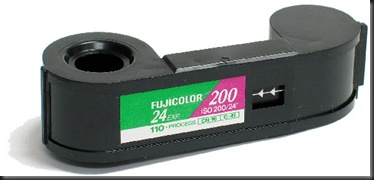
110 Film

where the film was wound on from one spool, through the camera where it would be exposed and then onto the second spool.
These cameras, commonly known as pocket cameras (due to their size) were available everywhere with some manufacturers branding them for the retail chains like Boots.
Because the film was encased in a cassette, therefore no threading a film leader into the camera, it was a very easy operation to load and unload the film into the camera, making these cameras very popular through their ease of use.  But due to the small size of the negative, 13 mm x 17 mm, enlargements where difficult.

110-film-negative

Some manufacturers, including Pentax even made a 110 SLR, to take advantage of the smaller film size:
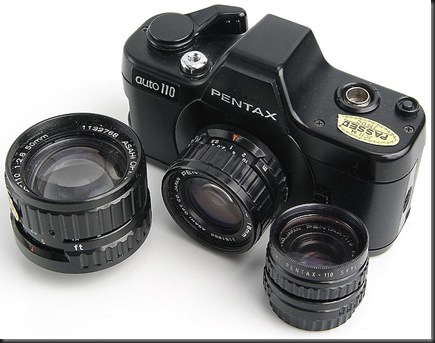
796px-Pentax_Auto_110
I did actually see one of these cameras at an antiques fair some years ago, where it was too expensive for me to buy, as they are seen as a classic and hold there price well.

126 Instamatic Cameras
The 110 format took over from the earlier 126 cassette based film (which was a new cassette based film as opposed to the older 126 roll film, which was introduced in 1906 and discontinued in 1949).  This new 126 cassette  was introduced in 1963 for the new instamatic cameras, making loading and unloading the film very simple.
An example of one of the 126 Instamatic cameras is shown below:
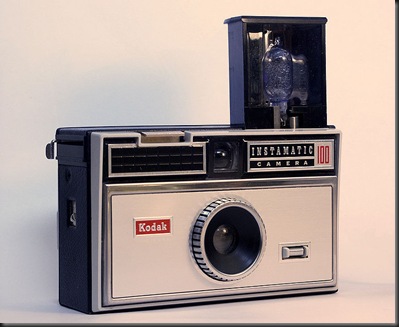
Kodak_Instamatic_100
Like the 110 film format that followed, the 126 format was a cassette based format:
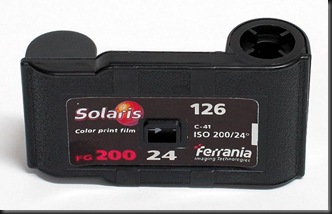
126 Instamatic_film
where the film was wound on from one spool, through the camera where it would be exposed and then onto the second spool.
Again,  like the later 110 film format, due to the small negative size (26.5mm x 26.5 mm) problems meant that very few people would try to print enlargements off these films.
126_film_negative_strip_(small)

Disc Cameras
A very different type of camera, and film format was the disc camera, which were developed from 1982:
Kodak Disk Camera
This type of camera was completely different in how they fed the film through the camera, instead of being on a roll, the film was on a disc, again this was a cartridge type:
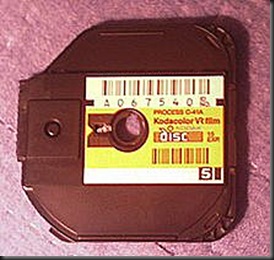
disc film cassette
As you can see from the picture below, the negatives are in a completely new way of arrangement, almost star like:
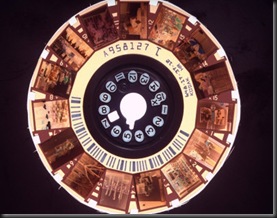
Disc Film
But these cameras had a very limited appeal due to the production of cheaper 35mm compact cameras.

APS (Advanced Photo System) Cameras
These were the first serious attempt to take on the traditional 35mm film, with some manufacturers, including Canon, Nikon and Minolta producing APS SLRs:
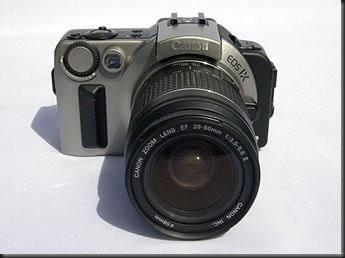
Canon_EOS_IX - APS SLR
This format allowed different types of photograph to be produced by one camera, including panoramic photographs.  These different sizes or types of photograph are known as:
  • High Definition (negative size 30.2 mm x 16.7 mm)
  • Classic (negative size 25.1 mm x 16.7 mm)
  • Panoramic (negative size 30.2 mm x 9.5 mm)
The way the classic and panoramic sizes are produced is by masking off areas of the high definition sized print.
Like the 35mm film the cassette is only loaded into one end of the camera, as the film is exposed it is wound through the camera, but then wound back into the cassette afterwards.  This allowed the cassette to be removed before it had been fully exposed, without ruining any prints.
APS Cartridge
One advantage over the 35mm cassette system is that the film can be removed from the camera, before it is fully exposed, without ruining the film. There are indicators in the end of the cartridge, to aid the photographer in identifying if the film is exposed or not, these indicators are shown below:
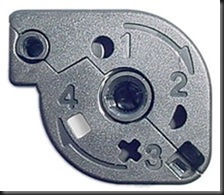
APS Indicators
These indicators show:
  1. Full Circle  -  Unexposed
  2. Half Circle  -  Part Exposed
  3. Cross        -  Exposed but not processed
  4. Square      -  Exposed and processed
In fact when people refer to the sensor sizes in a digital camera as APS-C or APS-H the sizes of the sensors relate to the sizes of the effective negative in APS cameras !

Instant Cameras
Finally, there are the instant cameras, made popular by Polaroid.
polaroid
These cameras held bulky film cassettes containing the film and battery pack, but once the photograph had been taken the print could be viewed almost instantly.  Early cameras used a film cassette that contained a film with a tear off front paper which was torn off to reveal the photograph, later cameras used a cassette that removed the need for the paper.
Although these cameras produced almost instant photographs, they were very limited and could not really be used for much more than snap shots.  Polaroid did produce smaller cameras, the “Joycam” with sticky backed prints, but these did not really catch on, being seen as more like a gimmick.
polaroid-joycam - small
With the advent of digital cameras instant cameras lost any advantage they had before.

Saturday, 9 October 2010

Media

This is the biggest difference between traditional film and digital photography.


Traditional Film Based Photography


There are a number of manufacturers of photographic film, including Ilford, Kodak, Fujifilm, and Agfa.  Although with the popularity of digital photography the selection of photographic film is decreasing, with some manufacturers completely finishing their production of photographic film.

Basically there are three types of photographic film:


Colour Print Film
Colour Slide Film
Black and White Print Film

These types films are available in different sizes, 35mm (for SLRs), 120 for larger more professional cameras.

Within these three types of film, there are different film speeds, eg 100, 200, 400.  These are the different ratings for the sensitivity of the films, measured in the ISO standard.  The lower the film speed the better the finished photograph looks, but more light (and therefore lower shutter speed) is required.

Finally, the films are available in different film lengths, usually stated as 12, 24 or 36 exposure films.


Digital Media (Memory) Cards


These cards have been described as digital film !


There are a number of different memory cards available on the market today, with some being replaced with newer upgraded formats.


The most common are:


Secure Digital
Compact Flash
XD
Sony Memory Stick               


In the case of the two last types of card, these are specifically for Olympus and some fujifilm cameras, and Sony cameras.

With the other cards, these are compatible with most other makes of camera, with some manufacturers moving between one format to the other, for example Canon who have used the older compact flash for some cameras and the newer Secure Digital for other cameras.

Multimedia cards look identical to Secure Digital memory cards with their size and shape but the difference is that the Secure Digital cards have a slide switch that can lock the card so that nothing can either be deleted nor added, making these cards safer when using on other peoples computers where you can lock the card to prevent the spread of any computer viruses.

All the memory cards come in capacities ranging from 512Mb to 16Gb, or even higher, with the exclusion of the XD cards who have a range up to 2Gb.

The memory cards also come in a range of write / read speeds, ranging from 2Mb per second up to 30Mb per second, with the latter more important to those who use HD video recording and high speed of frames per second when using RAW format.


Wednesday, 6 October 2010

Photographic Papers – film and digital

First of all, it is very important to say that there is a very important difference between the photographic paper used for printing from photographic film and the photographic paper used in digital photography:

Traditional photographic paper is very sensitive to light !

This might sound obvious, but I have heard about some people who bought a pack of traditional photographic paper, between them, and before someone could stop him, one of them started counting them out to the group in a well lit room, suffice to say the paper that he had taken out of the box was exposed and of no use to anyone !

Traditional Photographic Papers
That said, there are different grades of traditional photographic paper, which ranged from fine to course and gloss to matt and with different weights (thicknesses).
These papers must be used in a darkroom where they are first placed upon the enlarger where a negative has been placed in the enlarger head.  The enlarger is used to project and expose the photographic paper to the light through the negative.
Once the paper has been exposed with the necessary time it is put through a series of baths that develop and fix the exposure onto the paper.
This paper is then allowed to dry properly.

Digital (Printer) Photographic Paper
Unlike traditional photographic paper, digital photographic paper is used in photographic and other colour printers.
It is important to set the preferences of the printer to suit the type of paper used:

Printer Paper Types

Setting the wrong paper can cause the printer to print too much ink onto the paper.
Colours also look completely different when printed on plain paper compared to printing on gloss photographic paper.
Like traditional photographic paper, digital photographic paper comes in a number of different sizes and finishes, including:
Sizes
  • Traditional photograph sizes (6” x 4”, 7” x 5”, 8” x 6”, 12” x 10”, etc)
  • Standard European sizes (A6, A5, A4 and A3)
  • Special sizes (panoramic, banner, etc)

Finishes
  • Gloss
  • Matt
  • Perl
  • Semi-gloss
  • textured
  • Canvas
Digital photographic paper also comes in a range of different weights, producing traditional photograph like prints, to slightly thicker than normal paper prints.
I have used a selection of papers myself including canvas which gave an almost traditional canvas painting feel to the finished photograph.
The colours, their saturation and hue can be set using photographic editing software and the whole, or selected colours, can be brightened if necessary.

Saturday, 25 September 2010

Different Types of Digital Camera


There are four types of digital camera:

Compact Cameras

These range from the basic click and shoot cameras, to more advanced compact cameras which offer different ISOs, more program modes, manual mode, RAW capture.  These cameras have fixed lenses, in that you cannot change the physical lens, but many of these cameras do feature zoom lenses, which would sometimes cover many of the lenses you might need especially as some cameras feature up to 10x zooms.

My first digital camera was a compact camera, a Fujifilm Finepix 1400 Zoom.


This camera is between the point and click and the more advanced cameras.


Bridge Cameras

The next type of camera is the bridge camera.  These cameras are called bridge cameras because they bridge the gap between compact cameras and SLR (single lens reflex) cameras.

These cameras also feature fixed lenses, but offer higher zoom ranges, up to 30x, and offer more features and allow the photographer to be more creative.


Above is the Fujifilm Finepix S7000 bridge camera, like the one that I own, that I moved on to after the Finepix 1400 zoom.

This camera offered RAW capture using Fujifilm's RAF format, as well as a larger zoom range and far more control over the final photograph with metered manual mode.


Single Lens Reflex (SLR) Cameras

These cameras offer total control with more manual control, interchangeable lenses and a wide range of accessories.


The Pentax K10D shown above has the battery grip, which not only holds a second battery but also includes a second shutter button and front and rear e-dials for changing the shutter speed and aperture, whilst the camera is held to the photographer's eye.  This accessory is very handy as not only does it provide these features but can also store a second SD memory card (not directly accessible from the camera), and a Pentax remote control, but makes portraits and portrait style photographs easier because it provides a more natural way of holding the camera as opposed to simply rotating the camera and twisting the hands in order to access the camera controls.

The ability to change the camera lens makes these cameras more versatile than any other type of camera.


A newer form of interchangeable lens camera, similar to SLRs but sometimes referred to as micro systems.  One example of these is the Olympus Pen camera, shown above.


Medium Format Cameras


These are the larger cameras, offering resolutions of 40 megapixel for more professional photographers, and are very expensive.


Wednesday, 22 September 2010

Analysis of the Equipment Used – Tamron 18 – 200 mm Zoom Lens

Tamron18200main
This lens is a very versatile ‘Super Zoom’ which is capable of a very wide range of focal lengths ranging from 18 to 200 mm (or 27 to 300 mm in the terms of a 35mm SLR camera).
The lens has a large aperture of between f3.5 to f6.3 depending on the focal length of the lens at the time, with a minimum aperture of f22 making it a very versatile lens with a good large aperture for capturing action and a smaller aperture for a good deep depth of field.
The lens can focus down to 45cm (18”) which is handy for close photography like product and macro photography.
The lens has a lock on its body to prevent the lens from extending from it’s 18mm setting, which I have actually found very useful, and came with a good lens hood.
This lens has now become my standard lens as it offers a very good range of focal lengths, close focusing, and is a comfortable lens to use on the camera.  When I was using this lens in the studio to photograph Eric its wide focal length range meant I could compose the picture whilst maintaining the camera position preventing any issues of exposure difference, and not ending up almost standing on Eric’s toes.
My only dislike with many of today’s zooms is that they are all twist zooms as opposed to the older pull or push zooms.

Tuesday, 21 September 2010

Analysis of the Equipment Used - Pentax K10D

Pentax K10
K10
The Pentax K10D digital SLR is a 10.2 megapixel camera from Pentax, that I own.
I chose this camera because, when I purchased it, this camera was the best built camera that I could afford, and one of my more usual photographic areas involves Air Displays, where a camera should be able to take a bashing, especially in the event of an accident.
The camera has a built in anti-shake which is in the actual camera body, unlike some DSLRs which have their anti-shake systems built into the lens, this ensures that I have the facility available which ever lens I chose to use and saves me having to buy more expensive lenses just for this facility.

Exposure Modes
The K10D has a number of different exposure modes, these are detailed below:
mode Dial
Icon Mode
P Program Mode
SV Sensitivity Priority
TV Shutter Priority
AV Aperture Priority
TAV Shutter and Aperture Priority
M Manual
B Bulb
X External Flash Sync
USER User pre-set mode
Green Fully automatic mode
I have gone into more detail into each of the modes below:
Mode Description

Program
In this mode the camera sets the shutter speed and aperture according to the available lighting to give a correct exposure.  But the photographer can alter any one of these settings (shutter speed or aperture) using the front and rear e-dials (found both on the camera body and the battery grip) and the camera will automatically reset the other setting (aperture or shutter speed) accordingly.


Sensitivity Priority
In this mode the photographer sets the sensitivity (or ISO) and the camera sets the shutter speed and aperture.

This mode is very handy as it prevents the camera changing the ISO if the shutter speed and aperture cannot be changed enough to correctly expose the image.


Shutter Priority
This mode allows the photographer to set the shutter speed that they want and the camera changes the aperture, and if necessary the sensitivity (ISO) to match.
This mode is ideal for air display photography where you will want slower shutter speeds to capture the movement of propeller driven aircraft but faster shutter speeds for fast jet aircraft.


Aperture Priority
This mode is the opposite to the shutter priority mode in that the photographer sets the aperture and the camera changes the shutter speed, and if necessary the sensitivity) to suit.
This mode is ideal when you want full control over the depth of field for taking both landscapes and macro photography.


Shutter and Aperture Priority
In this mode the photographer can set the shutter speed and the aperture themselves and the camera will change the sensitivity (ISO) to compensate.


Manual
In this mode the photographer sets the shutter speed, the aperture size and the ISO themselves.  In the viewfinder a scale is used to check the exposure so that the photographer can choose which setting they wish to change without the camera changing anything else.
This is seen as the most creative mode where the photographer can capture the image that they want without any changes made by the camera to compensate for the photographers settings.


Bulb
This mode enables the photographer to keep the shutter open for as long as they wish, without the constraints of the range of shutter speeds.

This mode is ideal for capturing movement, especially at night, eg. fireworks, etc.


External Flash Sync
This mode is for synchronising the camera shutter release with external flash units.  It locks the shutter speed at 1/180 second and prevents it being changed accidentally.


User
The user mode allows the photographer to set a number of settings; exposure mode, flash settings, EV compensation, bracketing, file format, image tone, size, sharpness, saturation and contrast and store these settings on their camera so if they lend their camera to someone or a setting is changed they can reset the camera to their own preferences.


Green
This mode is a fully automatic snap  shot mode where the camera sets the shutter speed, aperture and sensitivity ready for the photographer to use.


Focusing Modes
Focus Modes2

The Pentax K10D has three focusing modes, these are:
Focus Mode Description

AF.S (Single)
In this mode the camera sets the focus and allows the photographer to capture the photograph in focus.

This mode is only suitable if neither the camera position or the subject position do not change.
This mode is ideal for landscape, product and macro photography where the camera and the subject are not moving.


AF.C (Continuous)
In this mode the camera locks the focus onto the subject and changes the focus to suit if the subject or camera move.

This mode is ideal for action and wildlife photography where the subject is moving or likely to move.


MF (Manual)
This mode allows the photographer to manually focus the camera, without any changes being made by the camera.

This mode is ideal where either the camera and subject are not moving, there is something between the camera and the subject that may affect the camera’s automatic focusing, or where the photographer is using a manual focusing lens, for example a catadioptic mirror lens.

Other Focusing Options
Focus Options
As well as the focusing modes above, the Pentax K10D, which uses eleven focusing points, offers three options concerning how the camera chooses which focus point to use, these options are:
Option Description

Auto
This is where the camera selects the focusing point, based on any movement being picked up by the focusing points.


SEL
This is where the photographer can choose which focusing point is used (the focusing point is highlighted in the viewfinder).

 
  . 
This is where the central focusing point is used, meaning the photographer has to make sure the subject is central in the viewfinder.

Metering Modes
Metering Modes
The Pentax K10D has three metering modes, details of these are shown below:
Icon
Mode Description
Spot Metering
Spot
In this metering mode the camera takes a light reading from the central 12% of the frame only, ignoring everything else.

This mode is very useful when there are distracting forms of lighting, in particular back lighting, which would otherwise cause the camera to under expose the photograph.

Centre Weighted
Centre Weighted
This mode also takes a light reading from the centre of the frame, but also takes in to consideration the wider central area.

This mode is useful for situations where there are less forms of lighting.

Multi
Multi Segment
This mode takes light readings from different parts of the frame, as well as the central area.

This mode is useful for general photography.

File Formats
Since the beginning of digital photography cameras have used the universal JPEG (Joint Photographic Experts Group) format for storing the digital photographs back in 1992.  Whilst this format allows the images to be viewed and edited on all platforms, as well as direct viewing on televisions, the format does have its limitations.
JPEG is a format that allows the image to be compressed to reduce the file size and enable the photographer to store more images on the memory card, but this compression can lead to problems such as artefacts where the camera in order to compress the image discards too much information, and splodges or irregular areas of colour are present where the compression algorithms do not maintain an even range of colours or tones.  The JPEG standard has another problem, in that it is a lossy format, whereby each time an image is saved and re-saved in the JPEG format more and more of the data is lost.
In today’s digital cameras the DSLRs, many of the bridge cameras and some of the more advanced compact cameras now retain the original RAW file from which the camera processes the JPEG photograph.  Each manufacturer have created their own RAW format for their range of cameras.
File Formats
The Pentax range of DSLRs have the advantage that not only do they capture the image in JPEG and the Pentax PEF RAW format but they can also capture the image in Adobe’s DNG (Digital Negative) format which is becoming more acceptable with photographic editing software.  
RAW formats
Looking at the range of image formats before the JPEG standard was developed, I can see the DNG format becoming the new standard for RAW images.

When taking photographs I prefer to capture the image in the RAW+ mode, whereby both the original RAW file together with the processed JPEG formats are stored, and although my photographic editor Serif’s Photo Plus X4 can handle both PEF and DNG formats, I tend to use the more universally accepted DNG format.